Share preview
Share hero
Share metadata
revision #51 #51 EyeAuras version 1.9.9518.0
uploaded by rrweso
released 3 weeks ago 05/13/2026 19:56:28
Application/Game
Share application tags Share application tag values Path Of Exile
Tags
Share user tags Share tag values farming bot PAID
Share badges Public pack with Private content
Share description
About this pack

BossRunner - Automated Endgame Boss Farming for Path of Exile

PAID EyeAuras pack

BossRunner automates the full invitation boss-farming loop in Path of Exile:

map device -> invitation -> boss fight -> loot -> hideout -> stash -> restock -> repeat

Built for long farming sessions, live monitoring, Auto Sales, recovery handling, and configurable behavior controls.


Links

Download:
https://eyeauras.net/share/S20260329213720n58CzQMZm3zk

Showcase:
https://www.youtube.com/watch?v=4eO1ujh5aGU
https://www.youtube.com/watch?v=gc4AJhlb3dE

Questions / test key:
Message autowerker on Discord.

More info on EyeAuras Discord channel:
https://discord.com/channels/636487289689866240/1488656158825644284

Discord invite:
https://discord.gg/edBKVfC2

Support is available for licensed users only.


What BossRunner Does

BossRunner runs the complete bossing cycle:

  • opens the map device
  • uses the selected invitation
  • enters the arena
  • executes the boss fight
  • handles deaths and recovery
  • waits for stable loot
  • picks up drops
  • returns to hideout
  • deposits items
  • searches stash tabs for the next invitation
  • starts the next cycle

No manual input is required between successful cycles once the setup is correct.


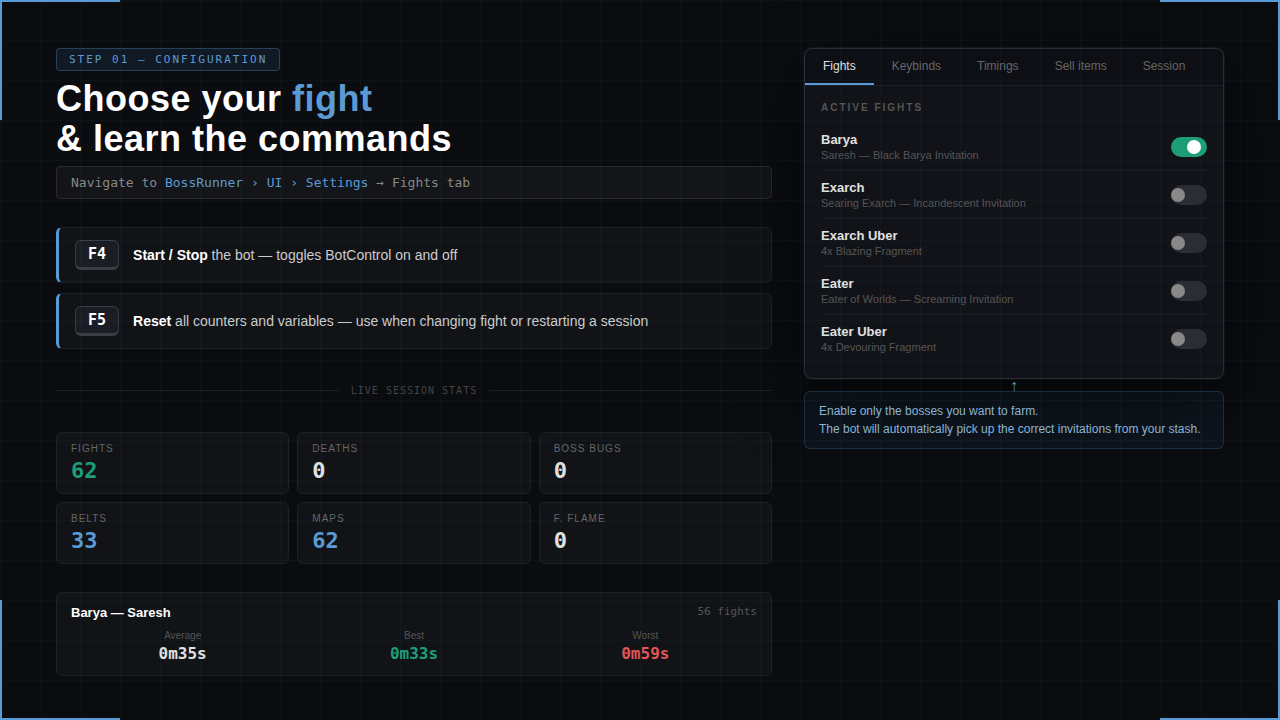
Supported Bosses

  • The Black Barya
  • Searing Exarch
  • Uber Searing Exarch
  • Eater of Worlds
  • Uber Eater of Worlds

Each boss has its own fight routine, portal handling, loot detection, and recovery flow.


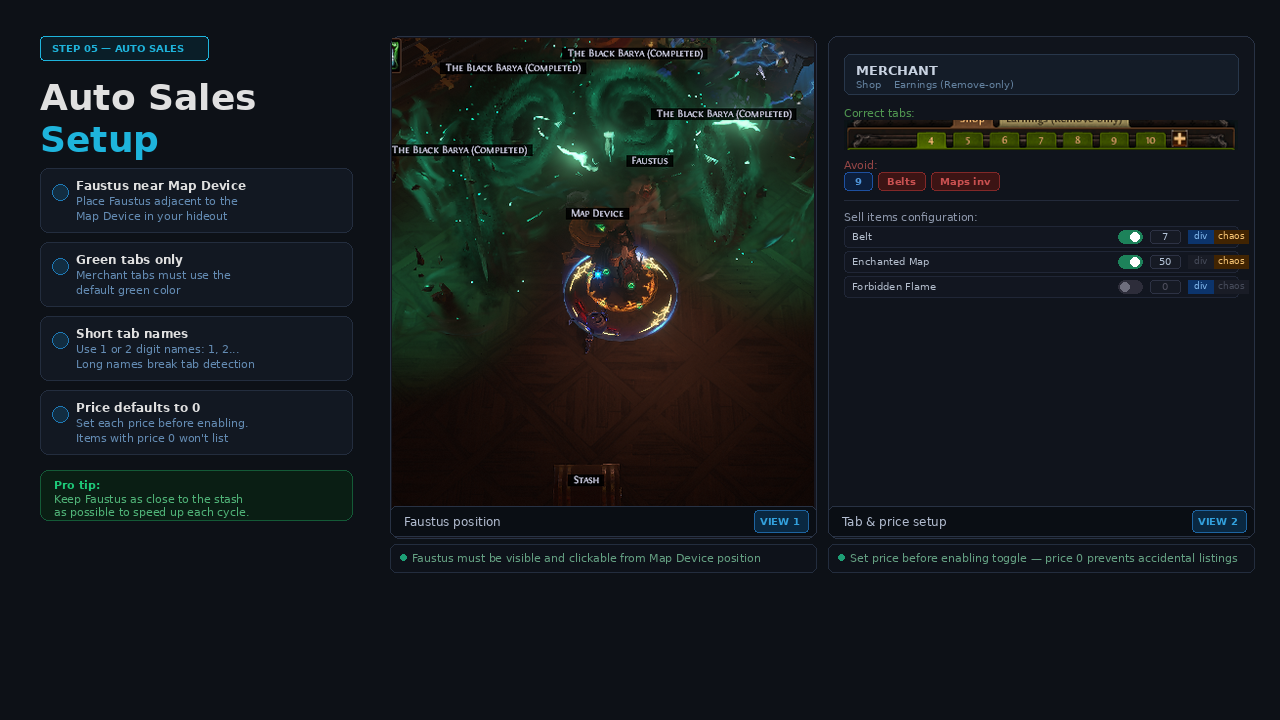
Auto Sales - Faustus Integration

BossRunner can optionally visit Faustus after each cycle and list supported farm items on your Merchant Tabs using prices configured in the overlay.

Features:

  • supported boss drops and farm items
  • per-item enable/disable
  • per-item price field
  • Divine / Chaos currency selection
  • automatic Merchant Tab navigation
  • earnings collection
  • stash fallback for remaining items

Supported examples include:

  • Belts
  • Maps
  • Forbidden Flame
  • Forbidden Flesh
  • Omni
  • Nimis
  • Ashes
  • and other configured items

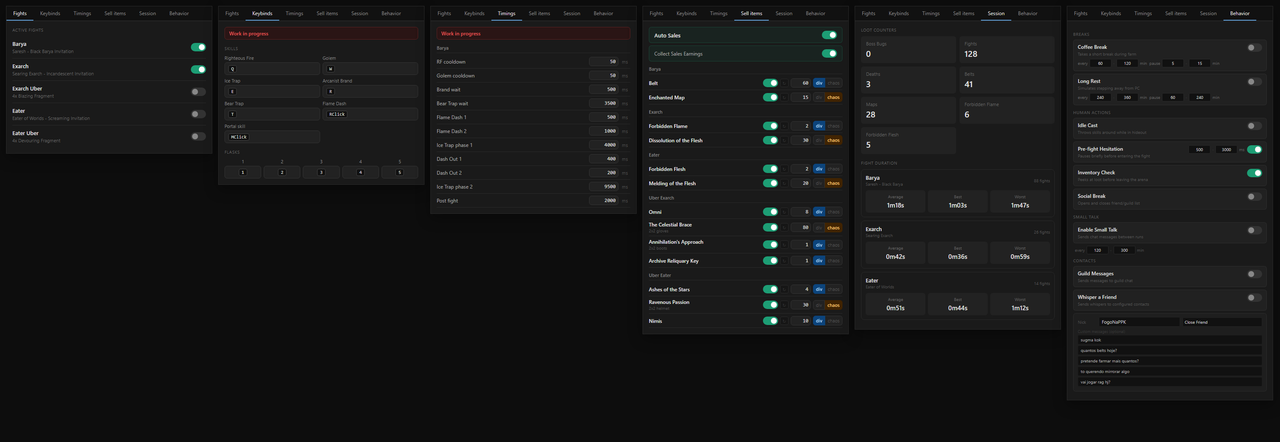
Live Overlay

BossRunner includes a live configuration overlay.

Tabs include:

  • Fights - enable or disable supported bosses
  • Keybinds - match the bot to your in-game setup
  • Timings - adjust timing values when needed
  • Sell Items - configure Auto Sales prices
  • Session - monitor current session stats
  • Behavior - configure optional long-session behavior controls

Session stats include:

  • completed fights
  • deaths
  • boss bugs
  • loot counters
  • average fight time
  • best fight time
  • worst fight time

Behavior Controls

The Behavior tab adds optional long-session controls without script editing.

Available controls:

  • Coffee Break - short configurable pauses during farming
  • Long Rest - longer configurable pauses for extended sessions
  • Idle Cast - occasional skill cast while waiting in hideout
  • Pre-fight Hesitation - optional delay before entering a fight
  • Inventory Check - occasional inventory peek after looting
  • Social Break - occasional social panel open/close action

BossRunner also includes built-in action delay and click spread controls for small input variation.


Stability And Recovery

BossRunner is designed around a recovery-focused state machine.

Included handling:

  • death recovery
  • loot stability checks
  • inventory-full fallback
  • boss bug timeout
  • catastrophic fallback
  • manual override hotkeys
  • session state tracking
  • periodic managed memory cleanup
  • clear pending/running script ownership

The goal is to keep the farming loop readable, monitorable, and recoverable during long sessions.


Required Setup

Before running BossRunner:

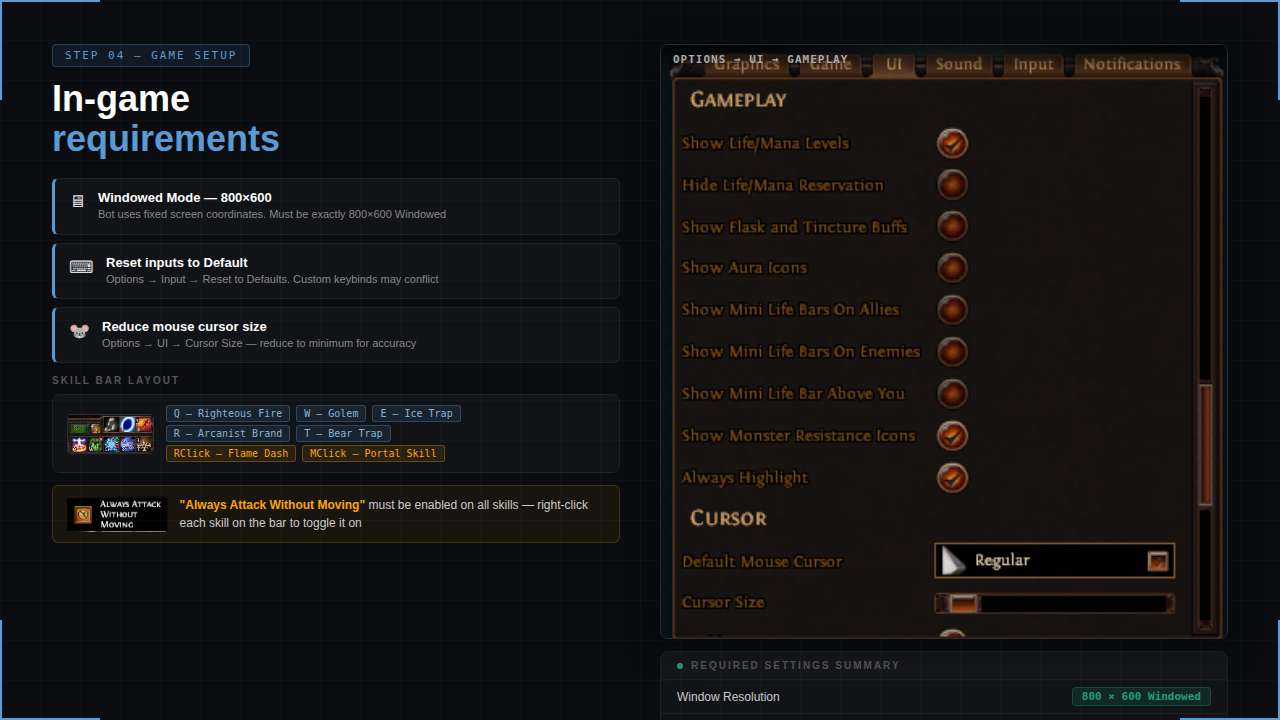
  1. Reset Path of Exile input settings to default.
  2. Use 800x600 resolution.
  3. Set all relevant skills to Always attack without moving.
  4. Use this skill layout:
  • Q - Righteous Fire / nothing
  • W - Golem / nothing
  • E - Ice Trap
  • R - Arcanist Brand / Cursed Ground
  • T - Bear Trap
  • Middle Click - Portal
  • Right Click - Flame Dash
  1. Make sure everything visible in-game is reflected correctly in EyeAuras.

Example:
If your stash is visible on screen, _Stash should be green/active on the EyeAuras left panel.
If not, open the _Stash aura and adjust match threshold or image quality.

  1. Some map devices have different Activate button positions.
    If mapdeviceinsideActivate is not green/active after right-clicking the invitation, adjust its position/color capture.

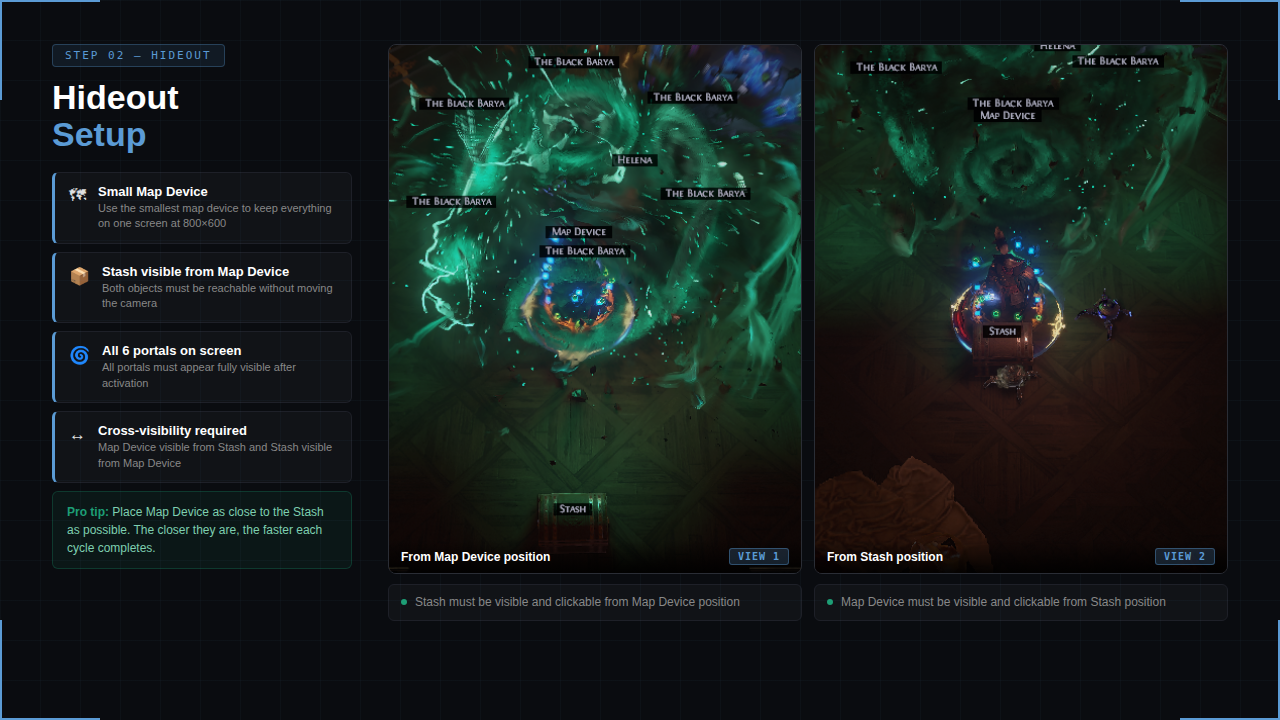
  2. You do not need to copy the exact same hideout, but use a clear layout where portals, stash, and map device are visible on the same screen.

  3. Use this bossing loot filter:
    https://www.filterblade.xyz/?profile=CB6%232691&saveState=KD5AGIPRVRKNCG&isPreset=false&game=Poe1

  4. Remove flasks, auras, buffs, life bars, and minion UI elements from the UI menu when possible.
    These can interfere with loot detection and affect the rotation.


Notes

  • This is a paid EyeAuras pack.
  • You run it locally on your own PC.
  • No account access is required.
  • Setup quality matters: resolution, keybinds, hideout layout, and EyeAuras condition matching must be correct.
  • Support is available for licensed users only.
Packing configuration

Pack settings
does not have a name
EyeAuras settings
Any ScriptOnly None Not uploaded 999 chars
Share revisions
Revisions

# Released User Pack
rev.51 3 weeks ago 05/13/2026 19:56:28 rrweso hidden