Stable
1.9.9774
Daily-driver build with the safest release cadence.
- Updated
- 18 weeks ago
- File Size
- 515.39 MB
- Release Notes
- Open notes
Stable is the recommended track for most users. Alpha gets you the newest capabilities first.
Daily-driver build with the safest release cadence.
Fastest release track with the newest features and experiments.
Every release stays linked here so you can inspect what changed before you switch versions.
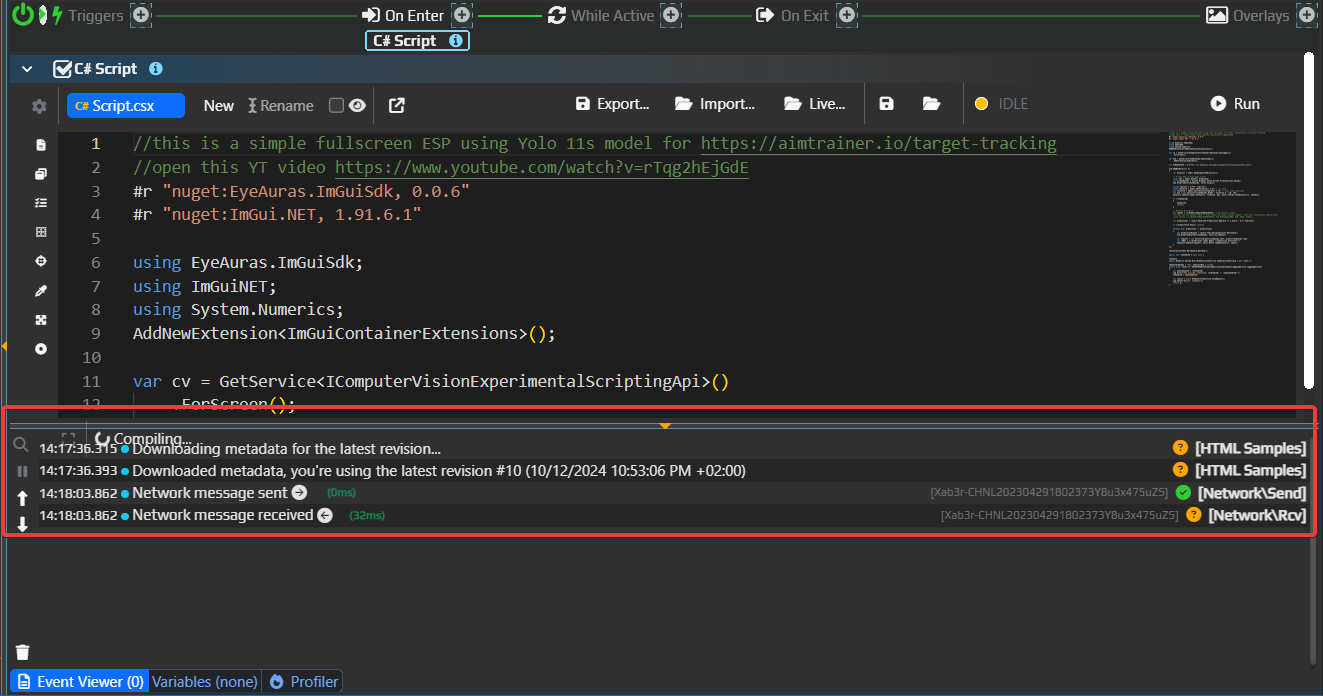
C# ScriptsWaitFor action now behaves exactly as Delay if it does not have any links in itLocalProcess memory-reader breaking after multiple sequential reloadsВ 8540 я попытался исправить проблему, показанную на скриншоте ниже: некоторые панели в программе перекрываются друг с другом, из-за чего интерфейс выглядит неприятно и «глючно».
К сожалению, причина не на стороне EyeAuras, а в одном из базовых фреймворков, который разрабатывает Microsoft. В феврале они сообщили, что баг наконец исправлен, поэтому я обновился до этой версии, и последние пару недель мы все тестировали их исправление.
По итогам тестирования мне пришлось откатить это изменение: новая версия действительно убрала проблему с перекрытием, но при этом принесла 3 новые проблемы:
Так что на данный момент проблема airspace вернулась. Я продолжу следить за ситуацией.
WindowHandle || ProcessName || WindowTitle instead of WindowHandle || WindowTitle || ProcessNameSo, what’s new?
Over the last few months, most of the work has gone into C# scripting. There were a lot of changes there, mostly focused on making development simpler and improving compatibility with different NuGet packages. Development is gradually shifting toward a better scripting experience overall — the goal is to make creating useful mini-apps as simple as possible, whether that’s a small automation tool or a full-fledged bot. Under the hood, they use EyeAuras’ extensive capabilities, but what they look like on the outside is your choice.
There is already a full set of features for this:
And that’s still not all — this list will soon grow to include cryptocurrency payments, fully hiding the EyeAuras interface, and much more. The goal is to minimize the time between having an idea and seeing happy users launch your mini-app.
I expect mini-apps to become the main way to fund the rest of EyeAuras development mentioned below. Time will tell whether that turns out to be true.
Nothing bad. Yes, the next few months will most likely be focused on scripts, but the plans include:
Those freezes when switching between auras will finally be gone. Startup should also become about 3–5 seconds faster. The transition will take around a year.
We already have Auras, Macros, Behavior Trees, and Scripts. All of them are great for solving different kinds of tasks: trees for full bots, auras for small simple automations like auto-potions, macros for automating a clearly defined sequence of actions, and scripts as the universal hammer for which everything looks like a nail. At this point, there is no problem that cannot be solved with the tools already available.
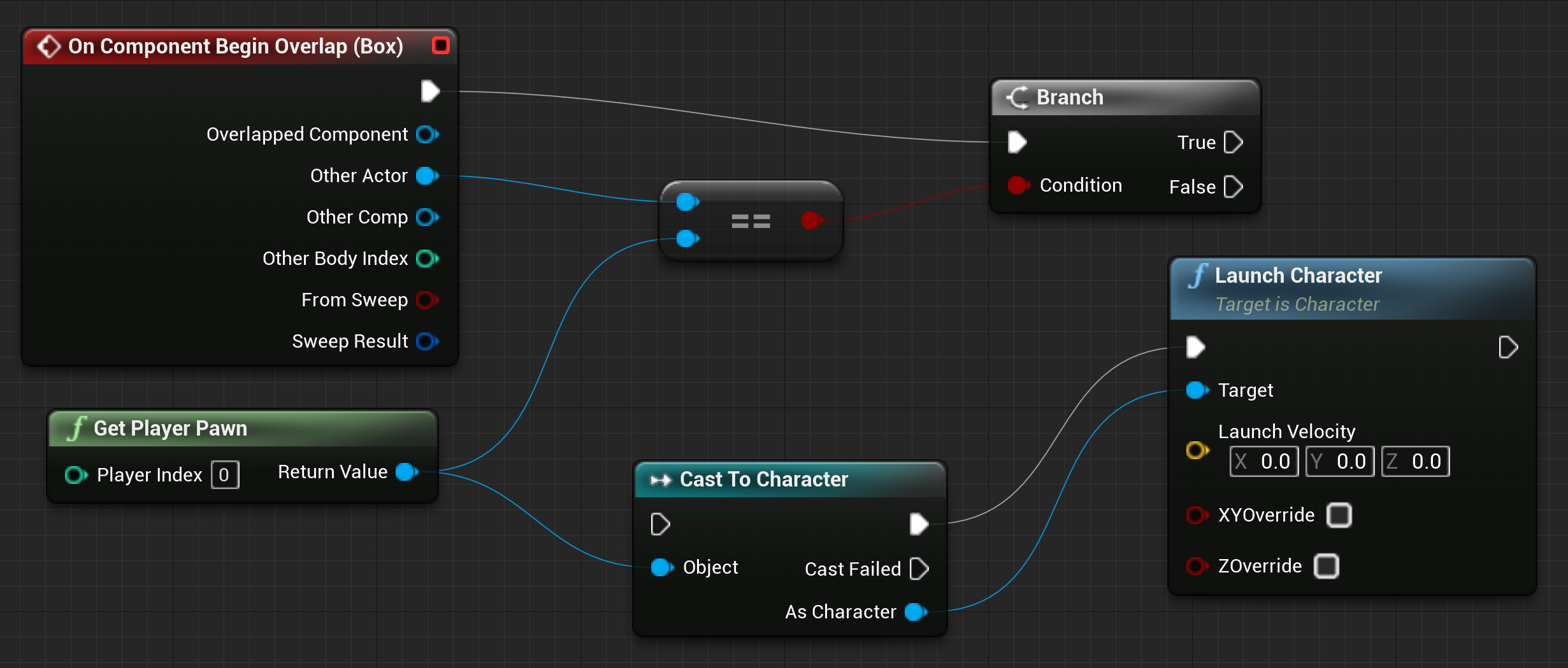
However, there is always room to grow. If you are familiar with Unreal Engine, you probably already know what this is about. The idea is to combine what already exists in Auras and Behavior Trees into one more visual programming tool: Blueprints. The main concept is to let users place Auras on the same canvas where they currently build Behavior Trees, and configure reactions to those aura triggers. That would give you everything needed to build logic in one place: events, action sequences, and standard control flow like loops — all visible at once. And of course, nothing prevents you from calling behavior trees or macros directly from blueprints.
This will take many months of development, but I think we will see the first results later this year.
This is a natural continuation of the mini-app idea. The difference is that your application becomes the main product, while EyeAuras turns into a huge toolbox you can use as needed. Want screen capture? No problem. Simulate input using one of a dozen methods? Also possible. Or maybe you want to embed only C# scripting and let users write their own code? The scripting infrastructure, proven over the years, is ready for that too. Absolutely every feature available in EyeAuras, without exception, is available as plug-in modules.
All technical issues have already been solved, and there are already early SDK versions that can be added to a C# application as a NuGet package. What remains are licensing and distribution details. The SDK will be paid — you buy it once and then use it however you want and as much as you want, with no dependency on EyeAuras infrastructure. It is a completely standalone product.
I will try to publish all details in the second half of the year.
More information, examples, and scripts are available here
DMA (Direct Memory Access) is a technology that allows reading or writing data directly in a computer’s RAM, bypassing the CPU and operating system. This makes it possible to access the memory of any process, even if it is protected by anti-cheats and mechanisms like Kernel Patch Protection (KPP), Hypervisor Protected Code Integrity (HVCI), user-mode hooks, and so on.
With DMA, you get:
ReadProcessMemory, but behind the scenes it is using the real PCIe busAnd now all of this is available through familiar EyeAuras C# scripting — without having to learn HDL, PCIe, virtualization, or drivers.
IMemory and IProcess APIsWork has started on native ImGui integration — an alternative way to build user interfaces in EyeAuras, complementing the existing Blazor components.
ImGui ("Immediate Mode GUI") is a lightweight and fast UI library originally created for tools inside game engines. It is used in dozens of AAA games and editors thanks to its simplicity, minimal setup, and high responsiveness. Unlike WPF or HTML, ImGui is not built around a declarative approach — it uses an imperative one, where the UI is rebuilt every frame. That makes it especially convenient for visualizing debug information and building simple interfaces.
For EyeAuras, this means:
.csx file, where both logic and UI live in one placeHere is an example (this code is explained in the guide: EN / RU):
AddNewExtension<ImGuiContainerExtensions>();

var osd = GetService<IImGuiExperimentalApi>()
    .AddTo(ExecutionAnchors);

osd.AddRenderer(() =>
{
    ImGui.Begin("My UI");

    ImGui.Text("Control window flags and interaction behavior.");

    var isActive = Trigger.TriggerValue ?? false;
    if (ImGui.Checkbox("Is Active", ref isActive))
    {
        Trigger.TriggerValue = isActive;
    }
    ImGui.SameLine();
    ImGui.TextDisabled("(Gets/Sets whether Trigger is active or not)");

    ImGui.Separator();

    if (Trigger.IsActive == true)
    {
        ImGui.TextColored(new Vector4(0f, 1f, 0f, 1f), "Trigger is currently ACTIVE");
    }
    else
    {
        ImGui.TextColored(new Vector4(1f, 0f, 0f, 1f), "Trigger is currently INACTIVE");
    }

    ImGui.End();
});
This approach is a great fit for users who are just starting to program but already want to build convenient interfaces for automation quickly. You still need a little bit of boilerplate to get started, but after that everything becomes intuitive and predictable. And ChatGPT can help with examples, UI generation, and logic.
It is now possible to create mini-apps fully implemented in a single .csx file — including UI, actions, logic, and even debugging elements.

Usb2Kbd is a hardware input emulator that has been supported in EyeAuras since roughly 2021.
Now you can build your own for about 10$ — all you need is a small device from AliExpress or Amazon.
Here is the full step-by-step guide: in Russian / in English
The technical side was also improved, and the settings window was redesigned.

All action nodes (Wait, MouseMove, KeyPress, etc.) now have Outputs.
The logic is the same as for other nodes — the connected node only runs if the current one finishes successfully.

You can now set Target Window and Input Simulator separately for each tree or macro. You can still configure them at the folder level as before — this extends the functionality rather than replacing it.

You can now "reference" another aura containing a C# Script action from a BT or Macro — similar to how one project references another in programming. All classes and types from that script then become available inside the BT.
The feature has existed for a long time, but it was "hidden" because it was unfinished and did not work the way it should.

Now you can have a C# class that analyzes the game (through Computer Vision or memory reading) and passes the data into a Behavior Tree for decision-making. Instead of cluttering the tree with checks and 50 variables, you can have one class — for example, TheGame — that wraps the data retrieval logic.
More information is available here
This is easier to show with an example. Suppose you created a new component in a script.
@namespace GameGrind
@inherits BlazorReactiveComponent
<!-- your Razor/HTML code -->
namespace GameGrind;

public partial class UserComponent : BlazorReactiveComponent {
    // some code
}
Notice the arbitrary namespace (GameGrind) that used to be inserted automatically when adding a new Razor component.
This was a small but very inconvenient detail: such code was hard to move into another EyeAuras script — you either had to change the namespace or live with multiple unrelated namespaces in the same codebase.
Now this is optional — you can omit the namespace declaration in both .razor and .cs files. EyeAuras will automatically inject the correct namespace during compilation. Less code = less headache.
A problem was fixed where the ComputerVision API could not load models or images from HTTP links, and two examples were added:
This example shows how to:
ComputerVision that can be used for image search, ML, OCR, and moreSendInput for input simulationOnScreenCanvas for drawing on the screenIn practice, these three tools are already enough to build a full bot :) Everything is available out of the box.

Almost the same as above, but it uses ImGui — a very powerful drawing library that can be used both for full UI and for drawing boxes, text, and other elements directly on the screen.
.NET is the platform EyeAuras is built on. It affects everything: startup, memory usage, and data handling.
.NET 8 was chosen because of its new memory management system, which outperforms all previous versions in benchmarks and is still being tested internally by Microsoft, so even the latest .NET 10 does not have it yet. EyeAuras has always favored higher memory usage in exchange for better performance, so a fast garbage collector is not a luxury for us — it is a necessity. In this version we still use the OLD mechanism, but as soon as it is clear that the new version is stable, we will enable it. This should lead to measurable improvements across the entire application.

It now uses the new UI framework and feels faster and more responsive.
Old editor

New

Macro rendering has been heavily reworked. This is not noticeable for small macros (fewer than 50 nodes), but the larger the macro, the more obvious the difference becomes. These are not the final changes in this area.
I am calling this out as a separate section because probably every EyeAuras user has run into this at least once: you resize one panel, and it starts overlapping another. The most common case is the C# Action panel overlapping the Event Log.
This bug is known as the WPF Airspace issue, and it has existed for more than 12 years. In the Microsoft UI framework used by EyeAuras specifically, it has been present since July 2020 link

And now, finally, after years of waiting, Microsoft fixed it. Hooray! Unfortunately, this is exactly the kind of issue that is extremely hard to fix from the application side, so all that was left was to wait.

This fix matters not only because the UI is now much more usable on low screen resolutions, but also because it blocked the transition to the new UI for triggers and actions. Previously, the only option was to rewrite everything at once — all triggers and all actions — and only then release it. Imagine months of development that nobody could use until release, followed by a huge number of bugs.
Now I can rewrite everything gradually. The work will still take months, but now it is at least actually feasible.
PoeShared.Blazor.Controls is now available in scripts by default; this is where ReactiveSection / ReactiveButton liveReadManaged<T>, which is slower than Read<T> but supports the MarshalAs attributeReadExports now returns a readable name along with the exported one, for example ?StaticClass@UGameEngine@@SAPAVUClass@@XZ -> public: static class UClass * __cdecl UGameEngine::StaticClass(void)Вынес это в отдельный раздел, потому что с этой проблемой наверняка сталкивался почти каждый пользователь EyeAuras: вы меняете размер одной панели, и она начинает накладываться на другую. Самый частый сценарий — когда C# Action наезжает на Event Log.
Это известный баг — WPF Airspace issue. О нём известно уже как минимум 12 лет. Конкретно в UI-фреймворке Microsoft, который использует EyeAuras, проблема существует с июля 2020: https://github.com/MicrosoftEdge/WebView2Feedback/issues/356
И вот теперь, наконец, после многих лет ожидания Microsoft это исправила. Ура. К сожалению, это была одна из тех проблем, которые очень сложно исправить на стороне самого приложения, поэтому мне оставалось только ждать.
Это исправление важно не только потому, что интерфейс стал удобнее на низких разрешениях. Оно ещё и убрало одно из самых серьёзных препятствий для переноса триггеров и экшенов на новый UI-фреймворк.
Раньше единственным рабочим вариантом было переписать ВСЕ триггеры и экшены сразу. По одному, постепенно, это делать было нельзя. Как вы понимаете, такой подход практически нереален: полный переписанный набор занял бы месяцы работы над кодом, которым никто не пользуется, а потом всё это пришлось бы выкатывать разом. Количество багов было бы огромным.
Теперь же я могу переписывать триггеры и экшены постепенно. Переделка всё равно займёт месяцы, но теперь это хотя бы реально сделать.
IMemory -> ReadExports теперь возвращает человекочитаемую версию экспорта вместе с исходным именем, например: ?StaticClass@UGameEngine@@SAPAVUClass@@XZ -> public: static class UClass * __cdecl UGameEngine::StaticClass(void)Исправлена проблема, из-за которой API ComputerVision не мог корректно получать модели и изображения по HTTP-ссылкам, а также добавлены два новых примера:
В этом примере показано, как:
ComputerVision, который можно использовать для поиска изображений, ML, OCR и других задачSendInput, чтобы эмулировать вводOnScreenCanvas, чтобы рисовать поверх экранаНа практике уже этих трёх компонентов более чем достаточно, чтобы собрать бота :) Все нужные инструменты уже есть в коробке.
Почти то же самое, что и выше, но здесь используется ImGui — очень мощная библиотека для отрисовки, с помощью которой можно как создавать UI, так и рисовать боксы, текст и другие элементы прямо поверх экрана.
Usb2Kbd is hardware input emulator. It has been supported by EyeAuras since ~2021.
Now you can create your own for approximately 5$ - the only thing that is needed is small device from AliExpress/Amazon.
Here is the detailed step-by-step guide (russian / english).
I've also improved technical part and reworked settings window for better user experience.
В EyeAuras началась работа над нативной интеграцией с ImGui — это альтернативный подход к созданию скриптов и UI. Такой вариант должен быть самым простым для тех, кто только начинает писать код: да, для старта нужен небольшой boilerplate-код, но дальше всё становится довольно понятным. И ChatGPT здесь тоже может сильно помочь.
Наконец-то стало возможно создавать по-настоящему цельные мини-приложения в формате 1 script, где вместе находятся и UI, и логика автоматизации.
ReadManaged<T> — он работает медленнее, чем Read<T>, но учитывает MarshalAs и managed-структурыEyeAuras использует LeechCore — отличную библиотеку, разработанную Ulf Frisk, — для интеграции с DMA-устройствами. По сути, LeechCore является фактическим стандартом, с которым совместимо большинство подобных устройств.
Сейчас эта интеграция все еще находится на стадии alpha. Если хотите помочь с тестированием или вам интересно что-то разрабатывать в этом направлении — напишите мне.
На практике разработка с использованием FPGA-платы ничем не отличается от работы через ReadProcessMemory: EyeAuras берет на себя всю сложность управления LC API, переподключения, обработку ошибок и остальное. Вам остается только писать код.
Подробнее об этом здесь