Stable
1.9.9774
Daily-driver build with the safest release cadence.
- Updated
- 18 weeks ago
- File Size
- 515.39 MB
- Release Notes
- Open notes
Stable is the recommended track for most users. Alpha gets you the newest capabilities first.
Daily-driver build with the safest release cadence.
Fastest release track with the newest features and experiments.
Every release stays linked here so you can inspect what changed before you switch versions.
A new option is now available in Settings: Automatic update downloads.
When enabled, new versions will be downloaded in the background as soon as they become available, so you can install updates much faster than before.

Внедрены изменения инфраструктуры, которые существенно влияют на производительность отправки/получения сетевых сообщений. Они могут быть использованы для создания сети взаимосвязанных экземпляров EyeAuras, которые выполняют какие-то действия (удаленное управление, мультибоксинг и т.д.).
Теперь в каждом регионе (RU/EU) есть несколько хабов, и система будет пытаться выбрать ближайший к вашему физическому местоположению, что означает, что задержка должна существенно снизиться, особенно для RU/CIS, которые ранее частично использовали серверы EU даже для внутренних сообщений. Выберите ближайший к вам хаб, и новые правила маршрутизации попытаются выбрать именно тот сервер в этом регионе, который обеспечивает наилучшую задержку.

Обратите внимание, что, как и при любых изменениях инфраструктуры, есть шанс, что что-то сломается. Если вы заметите, что задержка (воспринимаемая) увеличилась, или что-то не работает так, как вы ожидали - пожалуйста, дайте знать.
Помимо развертывания дополнительных серверов и настройки маршрутизации, я внес изменения в обработку сетевых сообщений, это также должно было положительно повлиять на общую задержку. Теперь вы можете проверить, какая была задержка для каждого сообщения прямо рядом с временной меткой. Задержка рассчитывается с использованием местного времени отправителя и получателя (в UTC, поэтому часовой пояс не имеет значения), поэтому значение потенциально может быть не очень точным, если часы не синхронизированы.
Моя личная задержка снизилась с ~100мс до ~20мс после изменений на стороне сервера.
На сколько мне известно, сейчас пользователей из США не так много, масштабирование инфраструктуры до региона США больше вопрос финансовой жизнеспособности, все с технической стороны готово, поэтому когда придет время, я добавлю серверы в США.
Каждое действие/триггер/оверлей теперь может быть Игнорирован. Это контролируется флажком слева от его названия и, в общем, делает так, что игнорируемая сущность просто не существует. Для триггеров это исключит их из всех оценок. Для действий - они будут игнорироваться, даже если блок действий выполняется. Для оверлеев - закрыть и выгрузить оверлей.
Это особенно полезно, когда вы отлаживаете или настраиваете что-то и хотите временно отключить часть ауры.
p.s. это изменение не влияет на скриптинг C#
The TextSearch trigger now includes new options in the "Symbols" dropdown. These let you use Windows-based optical character recognition (OCR) to convert images into text. In testing, this approach proved to be more reliable and performant than the previous Tesseract-based OCR used in EyeAuras.
Please note: to use Windows OCR, you must install the required language pack in Windows. For example, if you want to recognize Spanish characters, the Spanish language pack must be installed on your system.
There is also one limitation that still needs to be addressed: Windows OCR does not support multilingual OCR. In practice, this means it cannot recognize Russian and English characters in the same sentence, for example. There are some well-known workarounds for this, but this method should first be tested as-is, without additional logic layered on top.
A few tips:
(Translation not required as the content is metadata and does not contain any language-specific text)
Чтобы учесть юридические аспекты, я включил обязательное лицензионное соглашение. В этом соглашении указано, что пользователь несет единоличную ответственность за соблюдение лицензионных соглашений любых приложений, которые они автоматизируют.
Как многие из вас знают, игры часто явно указывают, что автоматизация действий любым способом запрещена и может привести к бану. Пожалуйста, имейте это в виду.
Для эффективной работы EyeAuras окно, получающее ввод, обычно должно быть активным. Если это не так, у EyeAuras есть некоторые методы, чтобы автоматически вывести его на передний план.
На первый взгляд, это кажется простым вызовом API в одну строку. Однако из-за различных особенностей Windows это не так просто. В результате я реализовал несколько механизмов для увеличения вероятности успеха.
В этом релизе я ввел дополнительный код для улучшения производительности, особенно в крайних случаях и для приложений, устойчивых к автоматической активации.
Вкратце, если у вас возникают проблемы с активацией окна (например, окно не активируется, когда вы отправляете ввод), пожалуйста, свяжитесь со мной, так как в этой версии были сделаны корректировки.
Это может быть интересно для пользователей из РУ/СНГ - YooKassa теперь снова доступна и вы снова можете оплачивать картами.
You can now temporarily disable any action in an Aura by clicking the checkbox next to its name. This is useful for debugging, and it is also available through the scripting system, so you can switch which actions will run based on options the user selected in your Custom UI, config file, and so on.

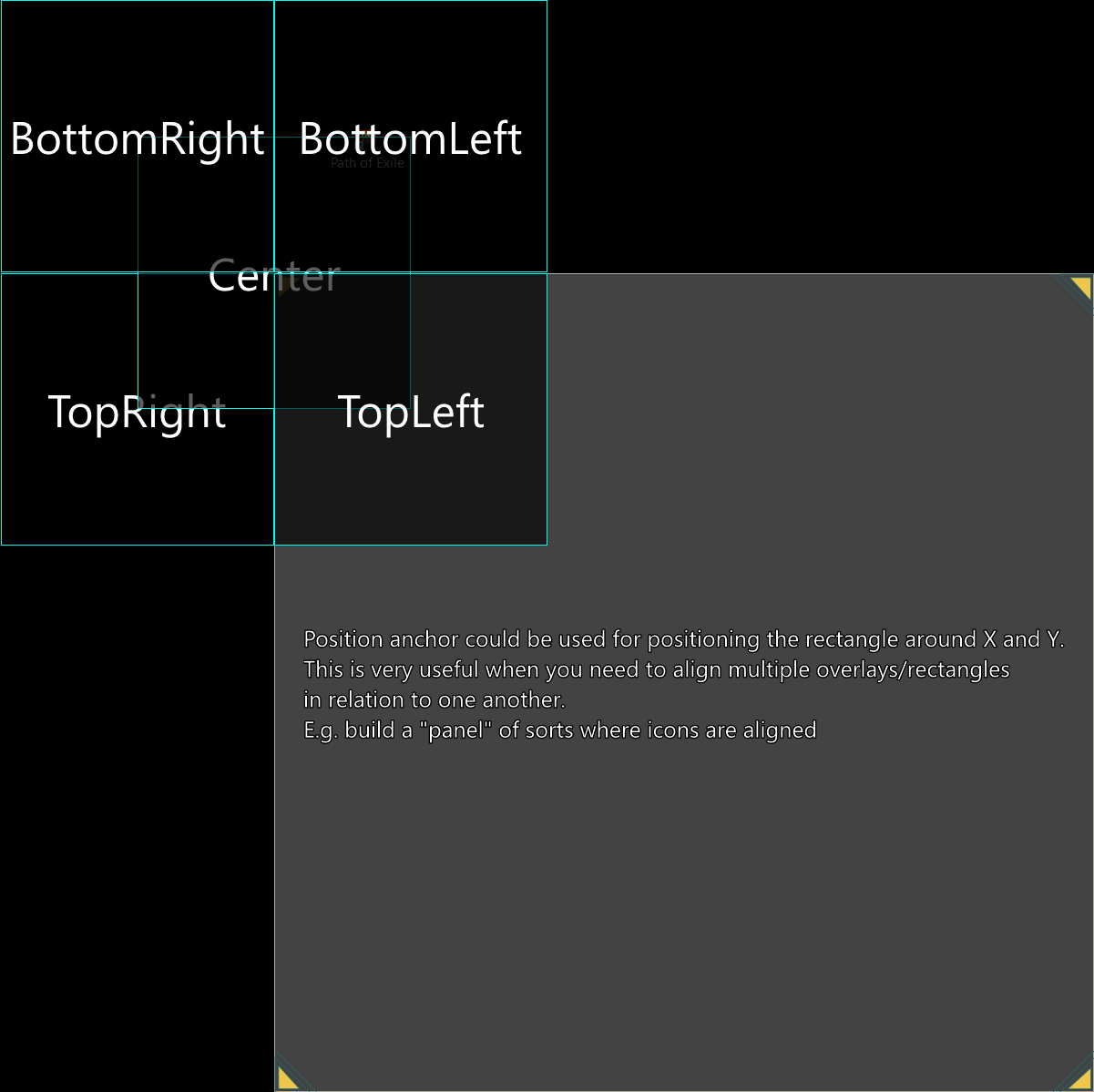
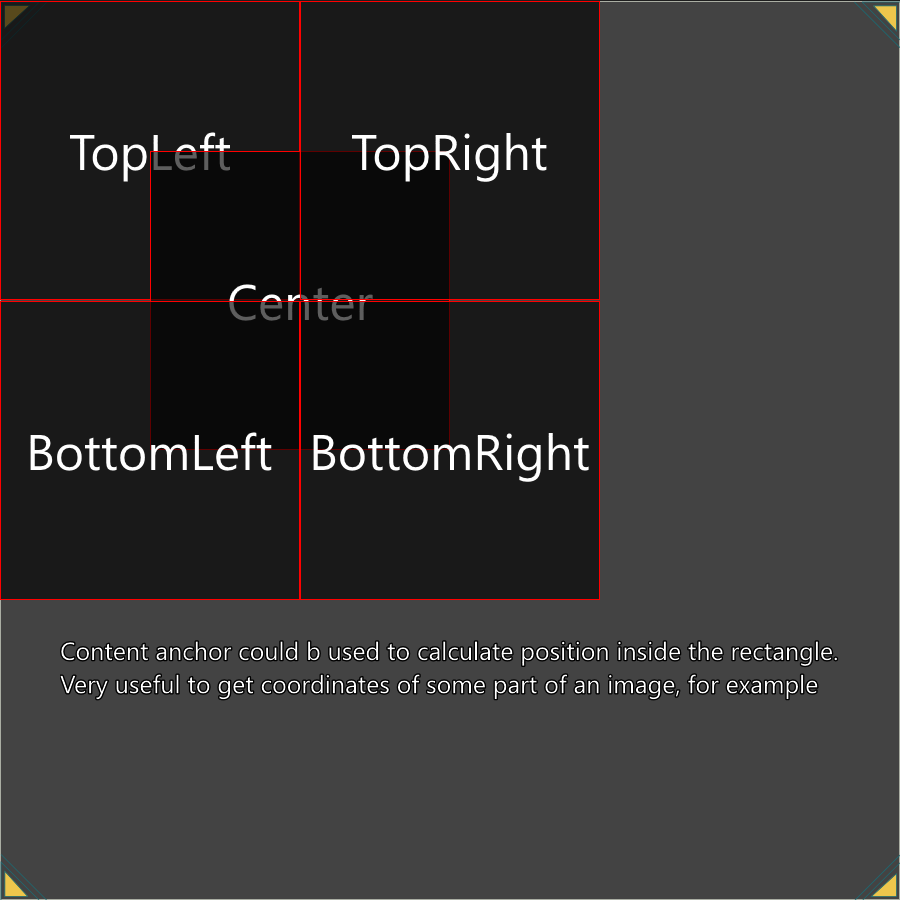
In 5397, I already made some changes to how anchors work across different EyeAuras screens, but that was not enough to cover some cases, such as clicking the center of an image found with Image Search.
So now we have two different anchor types: Position and Content. This should make the system more flexible, although it may also introduce a bit of confusion.
Here is the main rule:
More details and examples are available at https://wiki.eyeauras.net/en/coordinate-system
In June, the main focus was on improving scripting. Most of the results of this work will become available in August — behavior trees, pathfinding, and visualization.
I’m also actively working on a Diablo 4-related project that will bring together most of the current EyeAuras functionality to demonstrate what it is already capable of. Because of that, most of the systems I implement for that bot will also be released to all users as soon as their API is stable.
I’ll publish a detailed post once those features are ready for public use. If you’d like to try some of them earlier, feel free to contact me directly.
A lot has changed in the Wiki: https://wiki.eyeauras.net/en/home
HotkeyIsActive, allowing the user to quickly change the capture area by pressing a hotkey and dragging the overlay somewhere on the screenAnchors are the coordinate system used anywhere you need to select an area — screen regions, image regions, and so on.
The idea is simple: by choosing different reference points, you can easily align capture or output areas relative to one another.
More details and examples are available here: https://wiki.eyeauras.net/en/coordinate-system
This is a fairly niche feature available in the settings that lets you redirect all user input through a specific simulator.


Two months ago, I introduced a major new feature: the CustomUI overlay. It gave developers the freedom to build custom interfaces using the dynamic duo of C# and Razor, greatly expanding the possibilities for bot/aura customization. It also made navigating the EyeAuras interface more user-friendly.
That said, I realized there was still room for improvement. Developers are used to the power of integrated development environments (IDEs) such as Visual Studio and Rider, but until now those tools could not be fully utilized in the EyeAuras workflow. To change that, I improved the CustomUI overlay so your code can now be exported and saved as a C# project.
The exported project, including EyeAuras.SDK, can be opened in any IDE and gives you access to full autocomplete, unit testing capabilities, and much more. Keep in mind, however, that you still need EyeAuras to actually run the code. I am also working on support for connecting external NuGet packages, which will be the main focus in July.
Another highlight is the new Live Development mode, which lets you push changes into EyeAuras in real time. Whether you are tweaking styles or adding new bot logic, your changes can be reflected within seconds. The potential here is huge, especially with access to triggers, captured images, input simulators, and more.
Please note that actions and triggers currently still run on the old scripting engine, but I am working on migrating them to the new scripting engine while preserving backward compatibility.
In addition to the previous improvements, I added a new similarity calculation method based on Euclidean distance to the color search trigger. You can read more about it on the EyeAuras Wiki.